What is Cloud Gaming Service? Your Ultimate Guide
what is cloud gaming service

What is Cloud Gaming Service? Your Ultimate Guide

Unlock a new era of gaming: play any game, anywhere, without downloads or expensive hardware. Dive into the future today.

Start Gaming Now

Key Takeaways

  • ✓ Cloud gaming streams games from remote servers to your device.
  • ✓ Eliminates the need for high-end gaming PCs or consoles.
  • ✓ Requires a stable, high-speed internet connection.
  • ✓ Offers instant access to a vast library of games.

How It Works

1
You Make a Request

When you select a game, your device sends input (button presses, mouse movements) to a remote server. This server houses powerful gaming hardware.

2
Game Processes on Server

The server runs the game in real-time, just as if it were running on a local high-end PC. All the heavy graphical rendering and processing happen here.

3
Video Stream is Sent Back

The server then encodes the game's audio and video output into a compressed stream. This stream is rapidly transmitted back to your device over the internet.

4
You Play Instantly

Your device receives and decodes this video stream, displaying the game on your screen with minimal delay. This creates the illusion of playing locally.

Understanding the Fundamentals of Cloud Gaming Technology
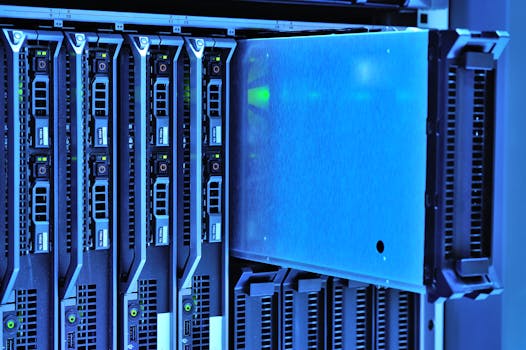
Detailed view of server racks with glowing lights in a data center environment. Photo: panumas nikhomkhai / Pexels
To truly grasp what is cloud gaming service, it's essential to peel back the curtain and understand the technological backbone that makes it all possible. At its core, cloud gaming operates on a client-server model, but with a highly specialized twist. Instead of downloading and installing games onto your local device – be it a PC, console, or mobile phone – the game itself resides and runs on powerful remote servers in a data center. Think of it like watching a YouTube video or streaming a movie on Netflix, but instead of passively consuming content, you're actively interacting with it in real-time. Your device, whether it's a budget laptop, a smartphone, or a smart TV, acts as a 'thin client.' It doesn't need to possess the cutting-edge graphics cards, processors, or vast storage typical of a high-end gaming rig. Its primary role is to send your commands (button presses, joystick movements, mouse clicks) to the remote server and then display the video and audio stream that the server sends back. This continuous loop of input-processing-output happens in milliseconds, creating the illusion of local play. The magic lies in the optimization of this data transmission. Cloud gaming services employ sophisticated video compression algorithms and network protocols to minimize latency – the delay between your input and the game's reaction on your screen. The goal is to make this delay imperceptible or at least negligible for the average player. This is why a robust and stable internet connection is paramount. The better your connection, the less visible the compression artifacts and the more responsive your gameplay will feel. Furthermore, these data centers are strategically located in various geographic regions to reduce the physical distance data needs to travel between you and the server, further cutting down on latency. This distributed network of servers is crucial for providing a consistent and high-quality experience to a global audience. Without these advanced technological underpinnings, the dream of playing graphically intensive games on virtually any device would remain just that – a dream. It's a complex orchestration of hardware, software, and networking that defines the very essence of modern gaming innovation. The rapid advancements in internet infrastructure, coupled with more efficient streaming technologies, have propelled cloud gaming from a niche concept to a viable and increasingly popular option for gamers worldwide.

The Transformative Benefits and Inherent Challenges of Game Streaming

Elderly man playing video games on tablet, smiling, at home interior setting. Photo: Kampus Production / Pexels
The appeal of cloud gaming services is multifaceted, offering a compelling proposition for many players. One of the most significant advantages is accessibility. Cloud gaming democratizes access to high-fidelity gaming. No longer are you tethered to the substantial upfront cost of a powerful gaming PC or the latest console generation. This lowers the barrier to entry significantly, allowing more people to experience cutting-edge titles without breaking the bank. Imagine playing the most graphically demanding AAA game on an old laptop or even a tablet; this is the reality cloud gaming provides. Furthermore, convenience is a massive draw. There's no need for lengthy downloads, installations, or patching. Games are ready to play instantly, often with just a few clicks. This 'play anywhere, anytime' flexibility extends to device portability, allowing you to seamlessly switch between your smart TV, phone, or computer without losing progress, as your game state is saved on the server. However, this innovative technology is not without its hurdles. The most critical challenge is internet dependency. A stable, high-speed internet connection with low latency is non-negotiable for a good experience. If your internet is slow, unreliable, or subject to data caps, cloud gaming can quickly become frustrating, characterized by visual artifacts, input lag, and frequent disconnections. Geographical distance from servers can also introduce latency, even with a fast connection, impacting competitive gameplay where milliseconds matter. Another concern revolves around game ownership and library limitations. Unlike traditional gaming where you own a copy of a game, cloud gaming often operates on a subscription model, providing access to a curated library. If you cancel your subscription, you lose access to those games. The selection of available games can also vary between services, and not every title will be available on every platform. Finally, the environmental impact of running vast data centers continuously consumes significant energy, which is a growing consideration as the technology expands. Despite these challenges, the benefits of accessibility and convenience continue to drive the adoption and evolution of cloud gaming, making it a powerful force shaping the future of interactive entertainment.

Navigating the Cloud Gaming Landscape: Top Services and Their Offerings

Young woman gaming at a PC high-tech setup, wearing headphones. Photo: Matheus Bertelli / Pexels
The cloud gaming market is dynamic and competitive, with several key players vying for supremacy, each offering a unique blend of features, game libraries, and pricing structures. Understanding these differences is crucial when deciding which service best fits your gaming habits and budget. NVIDIA GeForce NOW stands out for its unique 'bring your own games' model. Instead of a subscription library, it allows users to stream games they already own on popular PC storefronts like Steam, Epic Games Store, and GOG. This means you can leverage your existing game library and play them on high-end NVIDIA GPUs in the cloud, even if your local hardware is underpowered. This flexibility makes it a favorite for PC gamers looking to extend the life of their library. Microsoft's Xbox Cloud Gaming (formerly xCloud), integrated with Xbox Game Pass Ultimate, offers a compelling all-in-one package. Subscribers gain access to a vast and constantly updated library of hundreds of Xbox titles, including first-party exclusives on day one, which can be streamed to a wide array of devices. Its deep integration with the Xbox ecosystem makes it particularly attractive to existing Xbox players or those looking to dive into that world without a console. Sony, while having PlayStation Plus Premium which includes cloud streaming for PS3, PS4, and some PS5 titles, has a more console-centric approach, often requiring existing PlayStation ownership for the best experience. Amazon Luna offers a curated selection of channels, allowing users to subscribe to specific game bundles rather than a single large library. This can be cost-effective if you only want access to certain types of games or publishers. Google Stadia, while having been a pioneer, ultimately shut down, highlighting the competitive nature and challenges of this market. Other services like Boosteroid and Shadow PC offer slightly different models, with Shadow PC providing a full Windows desktop in the cloud, giving users complete control over their gaming environment and software installations. When evaluating these services, consider factors such as the games you want to play, the devices you own, your internet connection quality, and your budget. Some services offer free tiers or trials, which are excellent ways to test the waters and see how well cloud gaming performs in your specific environment. The landscape is constantly evolving, with new games, features, and even new competitors emerging, making it an exciting space for gamers to explore. Each platform has its strengths, catering to different segments of the gaming community, from those who want access to a massive library to those who prefer to stream their owned PC titles.

Optimizing Your Cloud Gaming Experience: Tips and Common Pitfalls

A young man engrossed in a video game, wearing headphones and using a gaming chair. Photo: Yan Krukau / Pexels
To get the most out of what is cloud gaming service, a few key optimizations can significantly enhance your experience and avoid common frustrations. The most crucial factor is your internet connection. Aim for a wired Ethernet connection whenever possible, as Wi-Fi can be prone to interference and signal drops, leading to increased latency and visual stuttering. If Wi-Fi is your only option, ensure you're using a 5GHz band and are close to your router. Prioritize your gaming device on your router's Quality of Service (QoS) settings to ensure it gets preferential bandwidth. Close any unnecessary background applications and browser tabs on your device, as they can consume bandwidth and CPU cycles, potentially impacting performance. **Tips for a Superior Cloud Gaming Session:** * **Wired Connection is King:** Use Ethernet for the most stable and lowest latency connection. * **Optimize Your Wi-Fi:** If wireless, use 5GHz, minimize distance to router, and reduce competing devices. * **Minimize Network Congestion:** Avoid heavy downloads or streaming on other devices in your household while gaming. * **Use Compatible Controllers:** Many services perform best with official or widely supported gamepads to ensure minimal input lag. * **Adjust In-Game Settings:** While the server handles rendering, reducing resolution or frame rate settings within the game (if the service allows) can sometimes improve stream quality and responsiveness if your connection is borderline. * **Close Background Apps:** Free up local resources on your device. * **Choose the Right Server Region:** Select the server geographically closest to you within the service's settings. **Common Pitfalls to Avoid:** * **Ignoring Internet Speed Requirements:** Don't expect a smooth experience on a slow or inconsistent connection. * **Using a VPN:** VPNs add extra routing and latency, which is detrimental to cloud gaming. Disable it. * **Outdated Hardware/Software:** While cloud gaming is less demanding, ensure your device's drivers (especially GPU drivers if applicable) and operating system are up to date. * **Unrealistic Expectations:** Cloud gaming is excellent, but it's not entirely identical to local play, especially for highly competitive, frame-perfect games. * **Not Testing First:** Always take advantage of free trials to assess performance on your specific setup before committing to a subscription. By following these guidelines, you can significantly mitigate potential issues and unlock the true potential of cloud gaming, transforming your casual gaming sessions into fluid, immersive experiences.

Comparison

FeatureNVIDIA GeForce NOWXbox Cloud GamingAmazon Luna
Game Library ModelStream owned PC gamesSubscription library (Game Pass)Channel-based subscriptions
Cost (approx. monthly)$0-$20$16.99 (Game Pass Ultimate)$4.99-$17.99 per channel
Device CompatibilityPC, Mac, Android, iOS, TV, BrowserPC, Android, iOS, TV, BrowserPC, Mac, Android, iOS, TV, Browser
Game Ownership Required
Latency PerformanceVery Low (premium tiers)Low to ModerateLow to Moderate
Game SelectionYour PC Library + Free GamesHundreds of Xbox/PC titlesCurated per channel

What Readers Say

"I always wondered what is cloud gaming service, and now I'm a convert! My old laptop can finally play Cyberpunk 2077 without breaking a sweat. The setup was instant, and the streaming quality is shockingly good. It's like having a super-powerful PC in the cloud."

Alex P. · Austin, TX

"As a casual gamer, I didn't want to invest in an expensive console. Cloud gaming lets me jump into the latest titles on my smart TV with just a controller. It's incredibly convenient and has opened up so many new games for me to try."

Sarah L. · Miami, FL

"My internet isn't even fiber, but with a stable 100Mbps connection, I get crisp 1080p gaming with minimal lag. I've saved hundreds by not upgrading my PC, and I can play anywhere. It's truly a game-changer for budget-conscious gamers."

Mark T. · Seattle, WA

"Cloud gaming is fantastic for single-player games and co-op with friends. For competitive shooters, I still notice a slight input delay compared to local play, but it's getting better. Definitely worth it for the convenience and game variety."

Jessica R. · Denver, CO

"Being able to switch from my PC to my phone and continue playing the same game seamlessly is amazing. My commute is now much more entertaining. Cloud gaming services are perfect for anyone with limited time or multiple devices."

David G. · Chicago, IL

Frequently Asked Questions

What internet speed do I need for cloud gaming?

Most cloud gaming services recommend a minimum of 15-20 Mbps for 720p streaming and 30-50 Mbps or higher for 1080p or 4K. However, a stable connection with low latency (ping) is often more critical than raw speed. A wired Ethernet connection is always preferred over Wi-Fi for optimal performance.

Will I experience input lag with cloud gaming?

Some degree of input lag is inherent in cloud gaming due to the round-trip time for data. However, modern services have significantly minimized this. For most casual and single-player games, it's often imperceptible. For highly competitive, frame-perfect games, some players might notice it, but technology is constantly improving.

How do I choose the best cloud gaming service for me?

Consider the games you want to play (do you own PC games or want a subscription library?), your budget, the devices you plan to use, and your internet connection quality. Utilize free trials offered by services to test performance in your specific environment before committing to a subscription.

Is cloud gaming more expensive than traditional gaming?

Not necessarily. While you pay a monthly subscription, you save on expensive hardware upgrades (gaming PCs, consoles) and often gain access to a large library of games without individual purchases. For casual gamers or those on a budget, it can be significantly cheaper in the long run than buying new hardware and games.

How does cloud gaming compare to local gaming on a PC or console?

Local gaming offers the lowest latency and highest visual fidelity without internet dependency. Cloud gaming provides unparalleled convenience, accessibility across devices, and eliminates hardware costs. The trade-off is reliance on internet quality and potential minor latency differences, though these gaps are rapidly closing.

Who is cloud gaming best suited for?

Cloud gaming is ideal for gamers who don't want to invest in expensive hardware, those who want to play on multiple devices (PC, phone, TV), players with limited storage, or anyone seeking instant access to a large game library without downloads. It's also great for trying out new games before committing to a purchase.

Is my game progress saved in the cloud?

Yes, typically your game saves and progress are stored on the remote servers. This allows you to pick up where you left off, regardless of the device you're streaming from, providing seamless continuity across your gaming sessions.

What is the future of cloud gaming?

The future of cloud gaming looks bright, with continued advancements in streaming technology, lower latency networks (like 5G), and increasing game libraries. Expect more integration with various devices, higher resolutions (8K), and potentially more interactive experiences as the technology matures and becomes even more indistinguishable from local play.

Now that you understand what is cloud gaming service, it's time to experience the revolution firsthand. Dive into a world where your favorite games are just a click away, no downloads, no expensive hardware. Explore the possibilities and redefine your gaming journey today!

Topics: what is cloud gaming servicecloud gaming explainedgame streaming servicesbest cloud gaming platformsplay games without console
Leo List

IE Escorts NO Escorts US Escorts NZ Escorts AU Escorts
Brampton weed
Adultwork EstrelaBet Vai de Bet R7 Bet Betão Galera Bet Rainbet Bet9ja Shop SportyBet BetKing Sisal Loto Foot Hollywoodbets YesPlay Odibets RushBet Jugabet BetWarrior BetCity MSport betPawa Fortebet