What is Ray Tracing in Gaming? Ultimate Visual Guide
what is ray tracing in gaming

What is Ray Tracing in Gaming? Ultimate Visual Guide

Dive into the future of gaming graphics with ray tracing, experiencing unparalleled realism and immersion.

Explore Ray Tracing Now

Key Takeaways

  • ✓ Ray tracing simulates individual light rays for realistic visuals.
  • ✓ It enhances reflections, shadows, and global illumination.
  • ✓ Requires powerful GPUs, like NVIDIA RTX and AMD Radeon RX.
  • ✓ Transforms game environments into hyper-realistic worlds.

How It Works

1
Light Ray Generation

Virtual light rays are cast from the camera's perspective into the scene, simulating how light travels in the real world. These rays interact with objects in the game environment.

2
Interaction and Bounces

When a ray hits an object, it can reflect, refract, or be absorbed, generating new rays. This mimics how light bounces off surfaces, creating complex lighting effects.

3
Color and Intensity Calculation

The color and intensity of each pixel are determined by tracing the path of these light rays back to their light sources. This process accounts for all light interactions.

4
Image Reconstruction

Once all light paths are calculated, the data is used to render the final image on your screen. This results in incredibly accurate and lifelike lighting, shadows, and reflections.

Understanding the Fundamentals of Real-Time Ray Tracing

Two friends immersed in playing video games together in a cozy living room. Photo: Yan Krukau / Pexels
At its core, understanding what is ray tracing in gaming requires a dive into how light behaves in the real world. Traditional rasterization, the prevailing rendering technique for decades, works by projecting 3D models onto a 2D screen, then filling in the pixels. It's an efficient method, but it approximates lighting, reflections, and shadows using various tricks and pre-calculated data. This often leads to visuals that, while good, lack the subtle nuances of real-world light. Ray tracing, on the other hand, is a fundamentally different approach. Instead of approximating, it simulates the physical behavior of light. Imagine millions of tiny light rays emanating from a virtual camera, tracing their paths through the game world. When a ray hits an object, it interacts with it—it might reflect off a shiny surface, refract through a glass window, or be absorbed by a matte material. These interactions generate new rays that continue their journey, bouncing around the scene until they either hit a light source or dissipate. The color and intensity of each pixel on your screen are then determined by the information gathered from these traced rays. This computationally intensive process results in incredibly accurate and dynamic lighting. For instance, a reflection in a puddle will accurately mirror the surrounding environment, including objects that aren't directly in the camera's view. Shadows will be soft and diffused where light sources are broad, and sharp where they are narrow, just like in reality. Global illumination, which describes how light bounces off surfaces and indirectly illuminates other areas, becomes far more realistic, filling dark corners with ambient light reflected from nearby brightly lit objects. This level of fidelity was once exclusive to offline rendering for movies and architectural visualizations, taking hours or even days to render a single frame. The breakthrough for real-time ray tracing in gaming came with specialized hardware—dedicated RT Cores in NVIDIA's RTX GPUs and Ray Accelerators in AMD's Radeon RX cards. These hardware units are designed specifically to accelerate the complex calculations involved in tracing light rays, making it feasible to achieve these stunning visuals at playable frame rates. Without this specialized hardware, the performance impact would be too severe for interactive gaming. The implementation of ray tracing isn't an all-or-nothing affair; game developers often selectively apply ray tracing to specific effects where its impact is most noticeable, such as reflections, shadows, and global illumination, rather than tracing every single light ray for every single pixel. This strategic application helps balance visual fidelity with performance. The goal is not just to make games look pretty, but to enhance immersion, making virtual worlds feel more tangible and believable. When a character walks into a dimly lit room, and the light from a distant window realistically filters in, bouncing off the walls and creating subtle shadows, the player's sense of presence is significantly amplified. This shift represents a major leap forward in gaming graphics, pushing the boundaries of what's visually possible in interactive entertainment. It moves beyond static lighting models to dynamic, physically accurate light simulation, making every scene feel more alive and responsive to changes in the environment.

The Impact of Ray Tracing on Gaming Visuals and Immersion

Close-up of hands holding a game controller in a monochrome setting, capturing the essence of gaming. Photo: lalesh aldarwish / Pexels
The introduction of ray tracing has fundamentally reshaped our expectations for visual fidelity in video games. When asking what is ray tracing in gaming, one of the most immediate answers is its transformative effect on realism. The most noticeable improvements typically come in three key areas: reflections, shadows, and global illumination. **Reflections:** Traditional game reflections often rely on screen-space reflections (SSR) or cube maps. SSR only reflects what's visible on the screen, leading to reflections that disappear at the edges or when an object moves out of view. Cube maps, while better, are static snapshots of an environment, meaning they don't dynamically update as the scene changes. Ray-traced reflections, however, are physically accurate. Every shiny surface – from a polished floor to a wet road, a metallic weapon, or a character's eye – can accurately reflect its surroundings, including objects, characters, and dynamic lighting that are off-screen. This adds incredible depth and realism, making environments feel far more cohesive and interactive. Imagine walking through a cyberpunk city with neon lights reflecting perfectly in every puddle, or seeing your character's face subtly mirrored in a highly polished armor piece. This level of detail makes the world feel truly alive. **Shadows:** Shadows are crucial for grounding objects in a scene and conveying depth. Older methods use shadow maps, which can suffer from aliasing (jagged edges) and often lack realistic soft edges or penumbras (the partially shaded outer region of a shadow). Ray-traced shadows are generated by tracing rays from light sources to objects. If a ray is blocked, that area is in shadow. This process naturally creates shadows with realistic softness, depending on the size and distance of the light source, and accurate self-shadowing, where objects cast shadows on themselves. This means shadows are no longer just dark blobs but dynamic, nuanced elements that respond to light sources with unprecedented accuracy. A tree's shadow will accurately depict each leaf, and the shadow cast by a distant building will correctly soften as it stretches across the ground, just as it would in reality. **Global Illumination (GI):** Perhaps the most profound, yet often subtle, improvement offered by ray tracing is in global illumination. GI describes how light indirectly illuminates a scene by bouncing off surfaces. Without GI, areas not directly lit by a light source can appear unnaturally dark or flat. Traditional techniques often use pre-baked lighting solutions that don't react to dynamic changes. Ray-traced global illumination simulates these light bounces in real-time. This means that a red wall will subtly cast a reddish tint on a nearby white wall, or light filtering through a window will bounce around a room, illuminating corners that would otherwise be pitch black. This creates a much more natural and immersive lighting environment, adding a sense of volume and depth to every scene. The world feels more tangible because light behaves exactly as expected, enriching the atmosphere and making virtual spaces feel more authentic. The combined effect of these enhancements is a dramatic increase in immersion. When the visual elements of a game behave in a way that closely mimics the real world, the brain has less work to do to suspend disbelief. This allows players to become more deeply engrossed in the game's narrative and world, fostering a stronger connection to the experience. The line between what's real and what's rendered blurs, pulling players deeper into the virtual reality presented before them. It's not just about graphical fidelity; it's about believable environments that enhance storytelling and gameplay.

Hardware Requirements and Performance Considerations for Ray Tracing
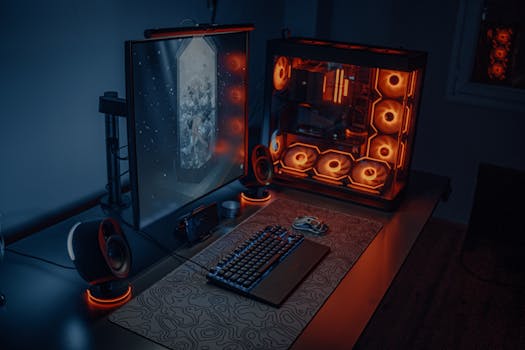
Sleek gaming desk setup featuring RGB lighting, large monitor, and gaming PC with glowing fans. Photo: Atahan Demir / Pexels
While the visual benefits of ray tracing are undeniable, understanding what is ray tracing in gaming also involves recognizing its demanding hardware requirements and the performance implications. Running ray tracing effectively requires significant computational power, primarily from your graphics processing unit (GPU). For mainstream adoption, specialized hardware was essential. NVIDIA was the first to introduce consumer-grade GPUs with dedicated Ray Tracing (RT) Cores in their RTX series (e.g., RTX 20-series, 30-series, 40-series). AMD followed suit with their Ray Accelerators in the Radeon RX 6000 and 7000 series GPUs. These specialized cores are designed to handle the mathematically intensive calculations involved in tracing light rays, dramatically speeding up a process that would otherwise cripple a standard GPU's performance. Without these dedicated units, even a powerful conventional GPU would struggle to maintain playable frame rates with ray tracing enabled. The performance impact of ray tracing varies significantly depending on the game, the specific ray tracing effects implemented (reflections, shadows, global illumination), and the resolution and settings you choose. Enabling all ray tracing effects at maximum settings can often halve or even quarter your frame rate compared to running the game without ray tracing. This is where upscaling technologies become crucial. Both NVIDIA's DLSS (Deep Learning Super Sampling) and AMD's FSR (FidelityFX Super Resolution), along with Intel's XeSS, play a vital role in making ray tracing more accessible. These technologies render the game at a lower internal resolution and then use advanced algorithms (often AI-powered) to upscale the image to your target resolution, maintaining impressive visual quality while significantly boosting frame rates. For example, a game running at 4K with ray tracing might only achieve 30 FPS natively, but with DLSS set to 'Quality' mode, it could jump to 60 FPS or higher, making the experience much smoother and more enjoyable. The choice of GPU is paramount. For a good ray tracing experience, especially at higher resolutions like 1440p or 4K, a higher-end GPU from the current or previous generation (e.g., NVIDIA RTX 3070/3080/3090/4070/4080/4090 or AMD Radeon RX 6700 XT/6800/6900/7800 XT/7900 XT/7900 XTX) is generally recommended. Older or lower-tier GPUs might technically support ray tracing, but the performance hit could make the game unplayable, forcing you to choose between stunning visuals and smooth gameplay. Furthermore, the CPU also plays a role, albeit a less dominant one than the GPU. A fast multi-core CPU helps ensure that the GPU isn't bottlenecked, allowing it to fully utilize its ray tracing capabilities. Sufficient RAM (16GB is now standard, 32GB is ideal for high-end gaming) and a fast SSD are also beneficial for overall system responsiveness and faster loading times, though less directly tied to ray tracing performance itself. In essence, while ray tracing delivers unparalleled visual fidelity, it's a demanding technology that requires a robust gaming PC to truly shine. The continuous advancements in GPU hardware and upscaling technologies are progressively making it more accessible, but for the foreseeable future, it remains a premium feature that benefits most from high-end components. As the technology matures, and new generations of hardware emerge, the performance overhead will continue to decrease, making real-time ray tracing an even more integral part of the gaming experience for a wider audience.

Optimizing Your Ray Tracing Experience: Tips and Common Mistakes

Close-up of a person playing video games at home with a wired controller on a couch. Photo: https://kaboompics.com/ / Pexels
To fully appreciate what is ray tracing in gaming without sacrificing performance, optimization is key. It’s not just about having the right hardware; it’s also about configuring your settings wisely. Here are some tips and common mistakes to avoid: **Tips for Optimizing Ray Tracing:** * **Prioritize Ray Tracing Effects:** Not all ray tracing effects are created equal in terms of visual impact versus performance cost. Ray-traced reflections and global illumination often offer the most noticeable visual upgrade. If your frame rate is struggling, consider disabling less impactful effects like ray-traced ambient occlusion or shadows, or reducing their quality setting first. * **Utilize Upscaling Technologies:** This is perhaps the single most important tip. Always enable NVIDIA DLSS, AMD FSR, or Intel XeSS if your hardware supports it. Set it to a 'Quality' or 'Balanced' preset. These technologies can provide a significant frame rate boost with minimal perceived visual degradation, making ray tracing much more playable. * **Adjust Resolution:** Playing at a lower resolution (e.g., 1440p instead of 4K) will drastically improve ray tracing performance. If you have a high-refresh-rate monitor, maintaining high FPS might be more important than pixel density. * **Lower Other Settings:** If frame rates are still an issue, consider reducing other demanding graphical settings that are not ray-traced, such as volumetric clouds, dense foliage, or anti-aliasing methods that are not DLSS/FSR/XeSS. These can free up GPU resources for ray tracing. * **Keep Drivers Updated:** Always ensure your GPU drivers are up-to-date. NVIDIA, AMD, and Intel frequently release game-ready drivers that include performance optimizations and bug fixes specifically for new games and ray tracing implementations. * **Monitor Performance:** Use in-game FPS counters or software like MSI Afterburner to monitor your frame rate and GPU utilization. This helps you understand which settings have the biggest impact and allows for informed adjustments. **Common Mistakes to Avoid:** * **Enabling All Ray Tracing Settings to Max:** Unless you have a top-tier GPU (like an RTX 4090) and are willing to accept lower frame rates, blindly maxing out all ray tracing options is a sure way to a choppy experience. Start with medium settings and increase gradually. * **Ignoring Upscaling:** Many players overlook or misunderstand upscaling technologies. Not using DLSS/FSR/XeSS when available is a missed opportunity to gain significant performance without a major visual trade-off. * **Over-reliance on CPU:** While a good CPU is important, ray tracing is overwhelmingly GPU-bound. Upgrading your CPU solely for ray tracing performance (if your current one isn't a severe bottleneck) might yield disappointing results compared to a GPU upgrade. * **Expecting Perfection from Older Hardware:** While some older GPUs might technically support ray tracing, expecting a smooth, high-fidelity experience on a mid-range card from a few generations ago is unrealistic. Manage your expectations based on your hardware's capabilities. * **Not Researching Game-Specific Implementations:** Ray tracing implementations vary wildly between games. Some games have excellent, optimized ray tracing; others might have less impactful or poorly optimized versions. Check reviews or benchmarks for specific games to set realistic expectations.

Comparison

FeatureRay TracingTraditional RasterizationPre-baked Lighting
Reflection AccuracyPhysically accurate, dynamicScreen-space or static cube mapsStatic, non-dynamic
Shadow RealismDynamic, realistic softness/penumbraShadow maps, often jagged/less realisticStatic, no dynamic light interaction
Global IlluminationReal-time, physically accurate bouncesApproximated, often pre-calculatedStatic, no indirect light bounces
Performance ImpactHigh, requires dedicated hardwareLower, highly optimizedVery low (pre-rendered)
Hardware RequirementHigh-end modern GPU with RT coresAny modern GPUN/A (rendering, not real-time)
Dynamic LightingExcellent, real-time responseLimited, relies on approximationsNone (static)
Immersion LevelSuperior, hyper-realisticGood, but less lifelikeModerate, can feel artificial

What Readers Say

"Understanding what is ray tracing in gaming completely transformed my perspective on game graphics. The reflections in Cyberpunk 2077 are just breathtaking, making the city feel incredibly alive. It truly adds another layer of immersion I didn't know I was missing."

Alex P. · Seattle, WA

"I was skeptical about ray tracing at first, but after playing Control with it enabled, I'm a believer. The way light bounces and shadows fall is so realistic, it makes the game's brutalist architecture even more stunning. It's a game-changer for visual fidelity."

Maria S. · Austin, TX

"My new RTX card with ray tracing is amazing. The difference in games like Metro Exodus is night and day; the lighting and atmosphere are so much more intense. I actually achieved better frame rates than I expected thanks to DLSS, which is a huge bonus."

John D. · Miami, FL

"Ray tracing is fantastic, but it definitely hits performance hard. I love the realistic reflections in Spider-Man Remastered, but I had to dial back some other settings to keep a smooth framerate. It's a trade-off, but usually worth it for the visual upgrade."

Emily R. · Denver, CO

"For me, what is ray tracing in gaming boils down to pure immersion. In horror games, the dynamic shadows and realistic lighting make every jump scare and dimly lit corridor ten times more effective. It's not just prettier; it enhances the entire gameplay experience."

Chris B. · Chicago, IL

Frequently Asked Questions

What is the main benefit of ray tracing in gaming?

The main benefit of ray tracing in gaming is its ability to produce incredibly realistic and physically accurate lighting, reflections, and shadows. This leads to a much more immersive and visually stunning game world, where light behaves just as it would in reality, enhancing depth and atmosphere.

Does ray tracing significantly impact game performance?

Yes, ray tracing is a computationally intensive technology that can significantly impact game performance, often leading to lower frame rates. This is why modern GPUs have dedicated hardware (RT Cores/Ray Accelerators) and why upscaling technologies like DLSS and FSR are crucial to maintaining playable frame rates while using ray tracing.

How do I enable ray tracing in my games?

To enable ray tracing, you first need a compatible GPU (NVIDIA RTX or AMD Radeon RX series) and a game that supports ray tracing. Once in the game's graphics settings, look for 'Ray Tracing' options, which usually allow you to enable specific effects like reflections, shadows, or global illumination. Ensure your GPU drivers are up to date.

Is ray tracing worth the performance hit?

Whether ray tracing is worth the performance hit depends on your personal preference and hardware. For many, the visual fidelity it adds to reflections, shadows, and global illumination is a game-changer for immersion. With modern upscaling technologies, the performance impact can often be mitigated, making it a worthwhile trade-off for a more realistic experience.

How does ray tracing differ from traditional rasterization?

Traditional rasterization projects 3D models onto a 2D screen and approximates lighting, while ray tracing simulates the path of individual light rays as they interact with objects in the scene. Ray tracing is physically accurate, leading to more realistic reflections, shadows, and global illumination, whereas rasterization uses various techniques to achieve similar, but less accurate, effects.

Who should use ray tracing in gaming?

Ray tracing is ideal for gamers who prioritize visual fidelity and immersion, own a modern high-end GPU with dedicated ray tracing hardware, and are looking for the most realistic lighting and reflections possible in their games. It's particularly impactful in games with dynamic environments and reflective surfaces.

Are there any downsides to using ray tracing besides performance?

Beyond performance, some minor downsides could include increased power consumption from your GPU and potentially higher temperatures. Also, if upscaling technologies are used aggressively, very subtle visual artifacts might occasionally be present, though these are often imperceptible during gameplay.

What is the future of ray tracing in gaming?

The future of ray tracing in gaming looks bright, with continuous hardware improvements making it more efficient and accessible. Expect to see more games incorporating ray tracing, expanded and more complex implementations, and further advancements in upscaling technologies, eventually making ray tracing a standard feature across all gaming experiences.

Now that you have a comprehensive understanding of what is ray tracing in gaming, it's time to experience this revolutionary technology for yourself. Upgrade your setup or simply enable it in your favorite compatible games to unlock a new level of visual realism and immersion. The future of gaming graphics is here, and it’s brilliantly illuminated by ray tracing.

Topics: what is ray tracing in gamingray tracing technologyreal-time ray tracinggaming graphicsNVIDIA RTXAMD Radeon RX
Leo List

IE Escorts NO Escorts US Escorts NZ Escorts AU Escorts
Brampton weed
Adultwork EstrelaBet Vai de Bet R7 Bet Betão Galera Bet Rainbet Bet9ja Shop SportyBet BetKing Sisal Loto Foot Hollywoodbets YesPlay Odibets RushBet Jugabet BetWarrior BetCity MSport betPawa Fortebet