Gaming PC Prebuilt vs Custom: The Ultimate Showdown
gaming PC prebuilt vs custom

Gaming PC Prebuilt vs Custom: The Ultimate Showdown

Uncover the ideal path to your next gaming rig, maximizing performance and value for your specific needs.

Choose Your Path

Key Takeaways

  • ✓ Prebuilt PCs offer convenience and warranty, but often at a higher price or with component compromises.
  • ✓ Custom PCs provide unparalleled control over components and potentially better value for money.
  • ✓ Building a custom PC requires technical knowledge and time, but offers a rewarding learning experience.
  • ✓ The 'best' option depends heavily on your budget, technical skill, and desired level of customization.

How It Works

1
Assess Your Needs

Determine your budget, the types of games you play, and your desired performance levels (e.g., 1080p, 1440p, 4K, high refresh rates). This initial assessment is crucial for guiding your decision-making process.

2
Research Components

If considering a custom build, thoroughly research CPUs, GPUs, motherboards, RAM, storage, and power supplies. For prebuilts, scrutinize component lists and reviews to ensure quality and compatibility.

3
Compare Options

Side-by-side compare specific prebuilt models with hypothetical custom builds within your budget. Look at performance benchmarks, upgradeability, and included warranties to make an informed choice.

4
Make Your Decision

Based on your research and comfort level with building, decide whether a prebuilt PC or a custom-built PC is the right fit for you. Purchase your components or your new rig and get ready to game.

The Allure of Prebuilt Gaming PCs: Convenience and Warranty
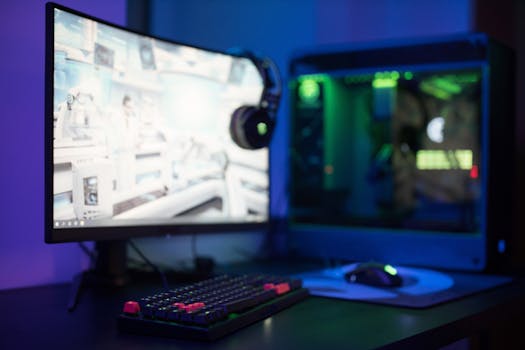
High-tech gaming setup featuring a curved monitor, RGB keyboard, and vibrant lighting. Photo: Ron Lach / Pexels
For many aspiring and experienced gamers alike, the idea of a prebuilt gaming PC holds significant appeal. The primary draw is undeniable convenience. Imagine: selecting a system online or from a store, clicking 'buy,' and having a fully assembled, tested, and ready-to-game machine delivered to your doorstep within days. There's no need to pore over compatibility charts, wrestle with tiny screws, or troubleshoot boot issues. This 'plug-and-play' experience is a massive time-saver and stress-reducer, especially for those who are either new to PC gaming, lack the time, or simply aren't comfortable with the intricacies of computer hardware assembly. Another substantial advantage of prebuilt systems is the comprehensive warranty and customer support that typically accompanies them. When you purchase a prebuilt PC, the entire system is covered by a single manufacturer's warranty. If a component fails or an issue arises, you usually deal with one entity for troubleshooting, repairs, or replacements. This unified support can be a huge relief compared to a custom build, where you might have to individually diagnose which component is failing and then deal with separate manufacturers for each part (e.g., GPU from NVIDIA/AMD, CPU from Intel/AMD, RAM from Corsair, etc.). This streamlined support can save a lot of headaches and downtime, ensuring you're back in the game faster. However, this convenience often comes at a premium. Prebuilt manufacturers incur costs for assembly, testing, marketing, and profit margins, all of which are factored into the final price. This means that, component for component, a prebuilt PC will almost always be more expensive than a custom-built PC with identical specifications. Furthermore, prebuilts sometimes feature what are known as 'proprietary parts' or 'OEM versions' of standard components. These might be slightly less powerful, less aesthetically pleasing, or harder to upgrade later on compared to their retail counterparts. For instance, a prebuilt might come with a basic, non-modular power supply or a motherboard with limited expansion slots, restricting future upgrades. Cooling solutions are another area where prebuilts can sometimes fall short. To cut costs, some manufacturers opt for stock coolers or basic air cooling setups that might struggle under heavy gaming loads, leading to higher temperatures and potentially throttled performance. While many reputable prebuilt brands like Alienware, CyberPowerPC, iBUYPOWER, and NZXT BLD offer excellent systems, it's crucial for consumers to meticulously scrutinize the exact components listed. Don't just look at 'RTX 4070'; look at the specific model, the CPU, the RAM speed, the storage type, and the power supply wattage. Understanding these details is key to ensuring you're getting good value for your money and not paying a premium for outdated or underperforming parts. The ease of getting started with a prebuilt is a powerful draw, but understanding its potential trade-offs is essential for a truly informed decision. For more details on choosing the right components, check out our guide on gaming PC components.

The Power of Custom-Built Gaming PCs: Control and Value
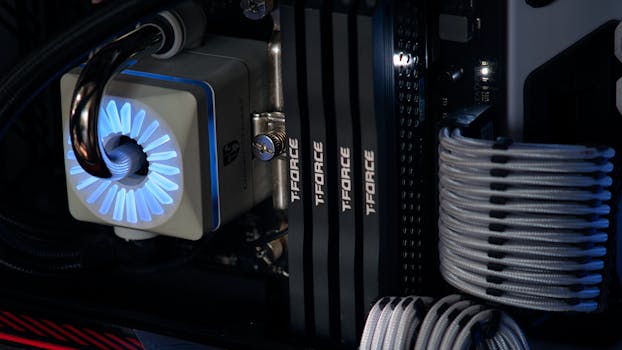
Detailed close-up of a computer cooling system featuring T-FORCE components and blue lighting. Photo: Ivelin Donchev / Pexels
Stepping into the realm of custom-built gaming PCs opens up a world of unparalleled control, customization, and often, superior value. When you decide to build your own PC, you become the architect of your gaming experience. Every single component, from the CPU and GPU to the motherboard, RAM, storage, power supply, and even the case and cooling system, is hand-picked by you. This level of granular control allows you to optimize your system precisely for your specific gaming preferences, budget constraints, and aesthetic desires. Want the fastest NVMe SSD for lightning-fast load times? You got it. Prefer a specific brand of GPU or a high-end liquid cooler for overclocking potential? The choice is yours. This bespoke approach ensures that every dollar you spend goes towards a component that directly benefits your gaming performance or user experience, minimizing wasted expenditure on unnecessary features or subpar parts often found in prebuilts. Beyond the sheer control, building a custom PC often translates to better value for money. By sourcing components from various retailers, taking advantage of sales, and avoiding the assembly and profit margins of system integrators, you can typically assemble a PC with identical or even superior specifications to a prebuilt for a lower overall cost. This cost saving can then be reinvested into a better GPU, more RAM, or a larger SSD, further enhancing your gaming performance. Furthermore, custom builds generally offer better upgradeability. Since you choose standard, off-the-shelf components, future upgrades are usually straightforward. Need a new GPU in three years? Simply swap out the old one. Want to add more RAM? Just pop it in. Proprietary parts and limited motherboard headers, common in some prebuilts, are rarely an issue with custom builds, ensuring your system remains relevant and upgradeable for years to come. However, the path of the custom builder is not without its challenges. The most significant hurdle is the requirement for technical knowledge and time. You'll need to research component compatibility, understand power requirements, and be comfortable with the physical assembly process. This involves installing delicate components, routing cables, and configuring BIOS settings. While there's an abundance of online guides and video tutorials that make the process more accessible than ever, it still demands patience and a willingness to learn. Troubleshooting can also be more complex; if your custom-built PC doesn't boot, you'll need to systematically diagnose which part is causing the problem and then deal with individual component warranties. Despite these challenges, many find the process of building a PC incredibly rewarding. It's an empowering experience that provides a deep understanding of your machine, fosters problem-solving skills, and often leads to a greater appreciation for the technology powering your games. It's a journey that culminates in a truly personalized gaming rig, built by you, for you. For those interested in optimizing their setup, considering factors like monitor refresh rates and response times is crucial to fully leverage a custom build's power. Learn more about gaming monitor choices.

Navigating the Middle Ground: System Integrators and Boutique Builders

High-tech gaming setup featuring a curved monitor, RGB keyboard, and vibrant lighting. Photo: Ron Lach / Pexels
While the core debate often centers on 'gaming PC prebuilt vs custom,' there's a significant and increasingly popular middle ground: purchasing from a system integrator (SI) or a boutique PC builder. These companies, such as Origin PC, Maingear, Falcon Northwest, or even larger operations like NZXT BLD and CyberPowerPC's custom configurators, bridge the gap between mass-produced prebuilts and a fully DIY custom build. They offer the convenience of a pre-assembled, tested system with the customization options typically associated with building your own. When you order from an SI, you usually start with a base configuration and then have extensive options to customize nearly every component. You can often choose specific models of CPUs, GPUs, motherboards, RAM, storage, power supplies, and even cooling solutions, cases, and RGB lighting. This allows you to create a system that closely matches your ideal specifications without having to physically assemble it yourself. The primary benefit here is that you get a professionally built and tested machine, often with superior cable management and aesthetic appeal compared to what a first-time builder might achieve. SIs also typically offer comprehensive warranties that cover the entire system, similar to traditional prebuilts, simplifying the support process if any issues arise. They handle the compatibility checks, the assembly, and the initial quality assurance, saving you time and potential frustration. However, this middle ground also comes with its own set of trade-offs. While offering more customization than off-the-shelf prebuilts, SIs generally charge a premium for their services. This 'builder's fee' covers the labor, expertise, and integrated warranty, meaning that a system configured through an SI will almost always be more expensive than if you were to buy the exact same components and build it yourself. The price difference can vary significantly depending on the builder and the complexity of the system. Additionally, while customization options are extensive, they are still limited to the parts and brands that the SI offers. You might not be able to choose every single obscure component you desire, but for most gamers, the selection is more than adequate. For gamers who want a high-performance, personalized machine but lack the confidence, time, or desire to build it themselves, system integrators offer an excellent solution. They provide a professionally assembled, warranted, and often aesthetically pleasing system that closely matches a custom build's component choices, without the DIY hassle. It's a compromise that balances convenience with control, making it an attractive option for many in the 'gaming PC prebuilt vs custom' dilemma. It's a path that offers peace of mind and quality assurance for a slightly higher investment. Understanding the nuances of these options helps you make an informed decision for your gaming setup.

Choosing Your Path: Tips for Deciding and Avoiding Common Mistakes

Black and white view of an active esports gaming studio with players immersed in video games. Photo: Nathan b Caldeira / Pexels
Deciding between a prebuilt and a custom gaming PC can feel overwhelming, but by asking yourself a few key questions and being aware of common pitfalls, you can confidently choose the best path for your gaming journey. **Tips for Deciding:** * **Assess your budget realistically:** Not just for the PC itself, but also for peripherals like a monitor, keyboard, and mouse. A higher budget often provides more flexibility for custom builds. * **Evaluate your technical comfort level:** Are you comfortable with hardware installation, troubleshooting, and potentially delving into BIOS settings? If not, a prebuilt or SI might be a better fit. * **Consider your time commitment:** Do you have several hours or days to dedicate to research, ordering parts, and assembling the PC? If time is scarce, convenience might outweigh cost savings. * **Prioritize upgradeability:** If you plan to upgrade components frequently, a custom build offers the most flexibility. For minimal future upgrades, a prebuilt might suffice. * **Think about warranty and support:** Do you prefer a single point of contact for support (prebuilt/SI) or are you willing to manage individual component warranties (custom build)? * **Research component specifics:** Whether prebuilt or custom, always look beyond the headline specs (e.g., 'RTX 4070') to the specific models and brands of each component. **Common Mistakes to Avoid:** * **Ignoring the power supply (PSU):** A low-quality or underpowered PSU can lead to instability or even damage components. Never skimp on the PSU, especially for a custom build. * **Overspending on aesthetics:** While RGB is fun, don't sacrifice core component performance (CPU, GPU) for flashy lights or an expensive case. Performance first, aesthetics second. * **Forgetting about cooling:** Inadequate cooling can lead to thermal throttling, reducing performance and component lifespan. Ensure your system has sufficient airflow and appropriate CPU cooling. * **Not checking component compatibility (custom build):** Ensure your CPU, motherboard, RAM, and GPU are all compatible before purchasing. Tools like PCPartPicker are invaluable for this. * **Buying a prebuilt without detailed specs:** Don't buy a prebuilt that only lists 'Intel i7' or 'NVIDIA RTX graphics.' Demand specific models (e.g., 'Intel Core i7-13700K', 'NVIDIA GeForce RTX 4070 Ti'). * **Underestimating the operating system cost:** Remember that Windows 11 (or your preferred OS) is an additional cost for custom builds unless you have a spare license. * **Neglecting peripherals:** A powerful PC is only as good as the display and input devices connected to it. Factor in the cost of a good gaming monitor, keyboard, and mouse. By carefully weighing these factors and avoiding these common missteps, you can make an informed decision that leads to a fulfilling and powerful gaming experience, whether you choose the convenience of a prebuilt, the control of a custom build, or the balanced approach of a system integrator.

Comparison

FeatureCustom-Built PCPrebuilt PCSystem Integrator (SI)
Cost-EffectivenessPotentially lowest (component for component)Highest (due to assembly/profit margins)Moderate (builder's fee added)
Customization/Control100% control over all partsLimited to manufacturer's configurationsExtensive customization options
Technical Skill RequiredHigh (assembly, troubleshooting)None (plug-and-play)None (professional assembly)
Time InvestmentHigh (research, assembly, troubleshooting)Low (order, receive, play)Low (order, receive, play)
Warranty/SupportIndividual component warranties (complex)Single system warranty (simplified)Single system warranty (simplified)
UpgradeabilityExcellent (standard parts)Variable (potential proprietary parts)Good (standard parts, often better cases)
Performance TuningMaximized (optimized parts, cooling)Variable (cost-cutting often present)Optimized (professional assembly, cooling)
Learning Experience

What Readers Say

"After agonizing over gaming PC prebuilt vs custom, I built my own. The process was challenging but incredibly rewarding, and I saved hundreds compared to a similar prebuilt."

Alex P. · Seattle, WA

"I needed a new gaming rig fast and didn't have time to build. My prebuilt gaming PC has been flawless since day one, handling all my games without a hitch. Absolutely worth the convenience."

Maria K. · Austin, TX

"I chose a custom build through a system integrator. I got the exact components I wanted, professional cable management, and a full warranty, resulting in a beast of a machine that consistently hits 144+ FPS in my favorite titles."

David L. · Miami, FL

"My prebuilt was a great entry point into PC gaming, though I wish I had paid more attention to the RAM speed and PSU quality. It's good, but I know I could've gotten more for the money if I'd built it myself."

Sarah J. · Denver, CO

"As a content creator who also games, the control over specific components in my custom build was non-negotiable. It performs perfectly for both rendering and high-refresh-rate gaming, something a generic prebuilt couldn't offer."

Mark T. · Chicago, IL

Frequently Asked Questions

What is the main advantage of a prebuilt gaming PC?

The main advantage of a prebuilt gaming PC is convenience and ease of use. It comes fully assembled, tested, and ready to play right out of the box, often with a comprehensive system-wide warranty and customer support, eliminating the need for technical expertise in building.

Is it always cheaper to build a gaming PC yourself?

While it's generally cheaper to build a gaming PC yourself due to avoiding assembly fees and profit margins, component prices fluctuate. Sometimes, during major sales or clearance events, a prebuilt might offer comparable value, especially for entry-level systems. However, for mid-to-high-end systems, DIY usually offers better value.

How difficult is it to build a custom gaming PC for a beginner?

Building a custom gaming PC as a beginner is a moderate challenge. It requires careful research, patience, and attention to detail, but with abundant online tutorials and guides, it's highly achievable. The process is often described as 'adult LEGOs' – it's more about following instructions than needing advanced electrical engineering skills.

Do prebuilt gaming PCs have good upgrade potential?

The upgrade potential of prebuilt gaming PCs varies significantly. Some manufacturers use standard components and cases, allowing for easy upgrades. Others might use proprietary parts, custom motherboards, or cramped cases that limit future modifications. Always check the specific components and internal layout before purchasing if upgradeability is a priority.

What are system integrators, and how do they compare?

System integrators (SIs) are companies that build custom PCs for you based on your chosen components. They bridge the gap between prebuilt and DIY, offering extensive customization like a custom build but with the convenience of professional assembly, testing, and a full system warranty like a prebuilt. They are typically more expensive than DIY but offer more control than off-the-shelf prebuilts.

Who should choose a prebuilt gaming PC?

A prebuilt gaming PC is ideal for individuals who prioritize convenience, want a plug-and-play solution, are new to PC gaming, lack the time or confidence to build, or prefer a single warranty point of contact. It's also suitable for those who don't plan extensive future upgrades.

Are there risks associated with building your own PC?

Yes, there are some risks, primarily related to damaging components during assembly (e.g., static discharge, incorrect installation) or encountering compatibility issues. However, these risks are significantly mitigated by careful planning, following instructions, and using anti-static precautions. Most components come with warranties that cover manufacturing defects, but not user-induced damage.

What future trends might impact the gaming PC prebuilt vs custom debate?

Future trends like increasing component integration (e.g., CPU/GPU on a single chip), modular PC designs, advancements in AI-driven troubleshooting, and evolving supply chain dynamics could impact the debate. We might see more standardized, highly upgradeable prebuilts, or conversely, more accessible DIY tools that further simplify custom building, continually shifting the balance.

Whether you choose the immediate satisfaction of a prebuilt or the empowering journey of a custom build, understanding the nuances of gaming PC prebuilt vs custom is key. Make an informed decision that aligns with your budget, skills, and gaming aspirations, and unlock your ultimate gaming experience today.

Topics: gaming PC prebuilt vs customcustom gaming PCprebuilt gaming PCbuild a gaming PCgaming computer comparison
Leo List
Brampton weed
Adultwork EstrelaBet Vai de Bet R7 Bet Betão Galera Bet Rainbet Bet9ja Shop SportyBet BetKing Sisal Loto Foot Hollywoodbets YesPlay Odibets RushBet Jugabet BetWarrior BetCity MSport betPawa Fortebet