How to Choose a Gaming CPU: Your Ultimate Guide
how to choose a gaming cpu

How to Choose a Gaming CPU: Your Ultimate Guide

Navigate the complex world of processors and build a gaming rig that delivers uncompromised performance and value.

Start Your Build

Key Takeaways

  • ✓ Clock speed and core count are crucial for gaming performance.
  • ✓ CPU choice impacts overall system balance and future upgradeability.
  • ✓ Intel and AMD offer competitive gaming processors.
  • ✓ Budget, resolution, and game types dictate the ideal CPU.

How It Works

1
Assess Your Gaming Needs & Budget

Determine what games you'll play, your target resolution/frame rates, and your overall budget. This foundation guides all subsequent decisions.

2
Understand Core CPU Specifications

Familiarize yourself with terms like clock speed, core count, threads, and cache. These metrics directly influence a CPU's gaming capabilities.

3
Compare Intel vs. AMD Offerings

Research the latest generations from both major manufacturers, considering their price-to-performance ratios and platform features. Each has strengths for different users.

4
Ensure Compatibility & Future-Proofing

Verify your chosen CPU is compatible with your motherboard and RAM. Also, consider its upgrade path to maximize your investment over time.

Understanding the Core Components of a Gaming CPU

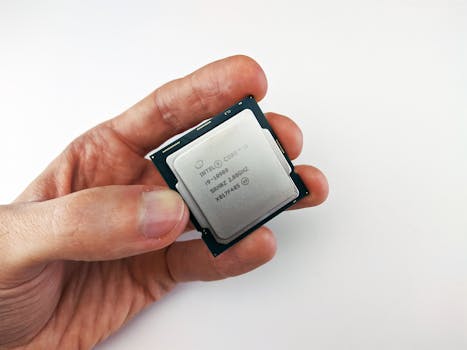
Choosing the right CPU for your gaming rig is arguably one of the most critical decisions you'll make, second only to your graphics card. Often referred to as the 'brain' of your computer, the Central Processing Unit (CPU) dictates how quickly your system can process instructions, execute game logic, and manage background tasks. While the GPU handles the heavy lifting of rendering graphics, a powerful CPU ensures that your GPU isn't bottlenecked, allowing it to perform at its full potential. Without a capable CPU, even the most expensive graphics card will struggle to deliver its promised frame rates, leading to a less-than-optimal gaming experience. At its heart, a CPU is comprised of several key components that impact its performance. The most talked-about are **cores** and **threads**. Cores are the individual processing units within the CPU, each capable of handling tasks. More cores generally mean the CPU can handle more tasks simultaneously, which is beneficial for multitasking, streaming while gaming, or playing games that are optimized for multi-core performance. Threads, on the other hand, refer to the number of instruction sequences a CPU can handle at once. Thanks to a technology called 'hyper-threading' (Intel) or 'simultaneous multithreading' (AMD), a single physical core can often manage two threads, effectively doubling its apparent processing capacity for certain workloads. For gaming, while more cores are good, raw single-core performance often takes precedence, especially in older or less-optimized titles. Another vital specification is **clock speed**, measured in gigahertz (GHz). This indicates how many cycles per second a CPU can execute. A higher clock speed generally translates to faster processing, which is particularly beneficial for games that rely heavily on quick, sequential calculations. Modern CPUs also feature 'boost clocks' or 'turbo frequencies' which allow them to temporarily increase their clock speed under specific thermal and power conditions, providing an extra burst of performance when needed. It's important to look at both the base clock and the maximum boost clock when comparing processors. **Cache memory** is another critical, yet often overlooked, component. This is a small, ultra-fast memory located directly on the CPU die, used to store frequently accessed data and instructions. The CPU can access data from cache much faster than from main system RAM, significantly reducing latency and improving overall processing efficiency. CPUs typically have multiple levels of cache (L1, L2, L3), with L3 being the largest and furthest from the core, yet still much faster than RAM. A larger and more efficient cache can lead to smoother gameplay, fewer stutters, and faster loading times. Understanding these fundamental elements of a CPU is the first step in making an informed decision about your gaming setup. It's not just about the numbers, but how they interact to deliver the performance you crave.

Intel vs. AMD: Navigating the Processor Landscape

For decades, the gaming CPU market has been dominated by two major players: Intel and AMD. Each company offers compelling processors with distinct architectures, pricing strategies, and ecosystem advantages. Understanding their current offerings and philosophical differences is paramount when deciding how to choose a gaming CPU that aligns with your specific needs and preferences. Both companies have made significant strides in recent years, leading to a highly competitive landscape that ultimately benefits consumers with more powerful and affordable options. **Intel**, historically the performance leader in single-core applications, has long been a go-to for gamers. Their Core i-series processors (i5, i7, i9) are well-known, with each tier representing different levels of performance and features. Intel's architecture often excels in raw clock speed and instruction per cycle (IPC) performance, which traditionally translated to higher frame rates in many games, especially those less optimized for multi-core CPUs. Their recent generations have introduced hybrid architectures, combining performance cores (P-cores) for demanding tasks like gaming with efficient cores (E-cores) for background processes, aiming to deliver a balance of power and efficiency. Intel's platforms typically offer robust features and stability, and their processors are often favored by those seeking maximum raw gaming performance in specific scenarios. However, Intel's pricing can sometimes be at a premium, and their platform upgrades often require new motherboards more frequently than AMD. **AMD**, once considered the underdog, has made a remarkable comeback with its Ryzen series processors. Built on the Zen architecture, Ryzen CPUs are renowned for their excellent multi-core performance, often offering more cores and threads at a given price point compared to Intel. This makes them incredibly strong contenders for gamers who also stream, edit content, or run other demanding applications simultaneously. AMD's processors often provide exceptional value, offering a great balance of gaming performance and productivity power. Furthermore, AMD has a strong track record of supporting their motherboard sockets (e.g., AM4) for multiple generations, offering a more forgiving upgrade path. Their integrated graphics solutions (APUs) in some Ryzen models are also a fantastic option for budget builds or for getting started without a discrete GPU immediately. While Intel might still hold a slight edge in some specific gaming benchmarks, AMD's overall package of multi-core prowess, value, and platform longevity makes them an incredibly attractive choice for a vast majority of gamers. Ultimately, the 'better' choice often depends on your specific use case, budget, and what other tasks your PC will be performing besides gaming.

Balancing CPU with Your GPU and Budget Considerations

When learning how to choose a gaming CPU, it's crucial to understand that a CPU doesn't operate in isolation. It's part of an intricate ecosystem where each component influences the others. The most significant relationship is between your CPU and your Graphics Processing Unit (GPU). This pairing is critical because an imbalance can lead to a 'bottleneck,' where one component is holding back the performance of the other. If you have an incredibly powerful GPU but an underpowered CPU, the CPU won't be able to feed instructions to the GPU fast enough, resulting in lower frame rates than the GPU is capable of producing. Conversely, an overpowered CPU paired with a weak GPU means the CPU will be waiting around for the GPU to finish rendering, leaving valuable processing power unused. The goal is to achieve a balanced system where both components are working optimally together. Generally, for higher resolutions (1440p and 4K) or graphically intensive games, the GPU tends to be the primary limiting factor. However, for competitive esports titles or games played at very high frame rates (1080p 144Hz+), the CPU becomes increasingly important as it needs to process game logic and prepare frames very rapidly. Therefore, your target resolution and refresh rate should heavily influence how you allocate your budget between these two vital components. A good rule of thumb is to dedicate a larger portion of your budget to the GPU for higher resolutions, but ensure your CPU is still robust enough to keep up. For high refresh rate 1080p gaming, a more balanced split, or even a slight lean towards a higher-end CPU, might be beneficial. Budget is, of course, a paramount consideration for most builders. CPUs range from under $100 to over $500, with a corresponding range in performance. It's tempting to splurge on the highest-end CPU, but doing so might mean compromising on other critical components like your GPU, RAM, or storage. Instead, aim for the best price-to-performance ratio within your budget. Mid-range CPUs from both Intel (e.g., Core i5) and AMD (e.g., Ryzen 5) often offer exceptional value for gaming, providing more than enough power for most modern titles without breaking the bank. For enthusiasts or those who stream professionally, stepping up to an i7/Ryzen 7 or even i9/Ryzen 9 might be justified. Remember, your CPU choice also dictates your motherboard and potentially your RAM type (DDR4 vs. DDR5), which adds to the overall platform cost. Always factor in the total platform cost, not just the CPU's sticker price, when making your decision. By carefully balancing your CPU choice with your GPU and overall budget, you'll build a system that delivers optimal gaming performance without unnecessary expenditure.

Key Factors & Common Mistakes When Buying a Gaming CPU

Making an informed decision about your gaming CPU involves considering several key factors beyond just raw specs, and being aware of common pitfalls can save you money and frustration. Here are some critical points to ponder and mistakes to avoid: **Key Factors to Consider:** * **Game Optimization:** Different games utilize CPU cores and clock speeds differently. Some games are heavily optimized for multi-core performance, while others still rely more on single-core speed. Research benchmarks for the specific games you intend to play most frequently. * **Cooling Solution:** High-performance CPUs generate significant heat. A stock cooler might suffice for lower-end CPUs, but for mid-to-high-range gaming processors, investing in a good aftermarket air cooler or an All-in-One (AIO) liquid cooler is essential for maintaining optimal temperatures and boost clocks. * **Motherboard Compatibility:** The CPU socket type (e.g., LGA 1700 for Intel, AM5 for AMD) must match your motherboard. Additionally, ensure your motherboard's chipset supports your chosen CPU generation and features (like PCIe 4.0/5.0, M.2 slots, RAM speed). * **RAM Speed and Latency:** Modern CPUs, especially AMD Ryzen processors, benefit significantly from faster RAM (e.g., DDR4-3600MHz or DDR5-6000MHz+) with lower CAS latency. This can noticeably improve gaming performance. * **Power Supply (PSU):** Ensure your power supply has enough wattage and the necessary connectors to power your CPU and the rest of your system, especially if you're pairing it with a powerful GPU. * **Future Upgrade Path:** Consider the longevity of the CPU socket. AMD has historically offered longer socket support, allowing for CPU upgrades without a new motherboard. Intel tends to change sockets more frequently. **Common Mistakes to Avoid:** * **Overspending on CPU:** Don't buy a top-tier CPU if it means sacrificing a better GPU. For gaming, the GPU typically has a greater impact on frame rates, especially at higher resolutions. A balanced system is key. * **Ignoring Cooling:** Underestimating the need for adequate cooling can lead to thermal throttling, where your CPU reduces its clock speed to prevent overheating, negating the performance you paid for. * **Bottlenecking Your GPU:** As discussed, a weak CPU can prevent a powerful GPU from reaching its full potential. Always aim for a balanced pairing. * **Forgetting Platform Costs:** The CPU price is just one part of the equation. Factor in the cost of a compatible motherboard, suitable RAM, and an effective cooling solution. * **Buying Last-Gen Without Research:** While last-generation CPUs can offer great value, ensure they still meet your performance needs and that the platform isn't nearing end-of-life support. Sometimes, a slightly more expensive current-gen option offers significantly better performance per dollar and a longer upgrade path. * **Only Looking at Core Count:** For gaming, single-core performance and clock speed are often more important than an extremely high core count, unless you're also heavily multitasking or streaming. An 8-core CPU with high single-core performance might outperform a 16-core CPU with lower clock speeds in many games.

Comparison

FeatureHigh-End Gaming CPU (e.g., Ryzen 9/Core i9)Mid-Range Gaming CPU (e.g., Ryzen 5/Core i5)Budget Gaming CPU (e.g., Ryzen 3/Core i3)
Target Resolution/FPS4K Ultra / 1440p High Refresh Rate1440p High / 1080p High Refresh Rate1080p Medium-High / 60Hz
Cores/Threads8-24 Cores / 16-32 Threads6-8 Cores / 12-16 Threads4-6 Cores / 8-12 Threads
Clock Speed (Boost)5.0 GHz+4.5 - 5.0 GHz4.0 - 4.5 GHz
Multitasking/StreamingExcellent (✓)Good (✓)Basic (✗)
Price Range (CPU Only)$350 - $600+$180 - $300$100 - $170
Recommended CoolingHigh-End AIO / Large Air CoolerMid-Range Air Cooler / Basic AIOStock Cooler / Basic Air Cooler

What Readers Say

"This guide completely demystified how to choose a gaming CPU for me. I used to just pick the most expensive one, but now I understand how to balance it with my GPU and save money. My new build runs perfectly!"

Alex P. · Austin, TX

"As a first-time PC builder, the breakdown of Intel vs. AMD was invaluable. I chose an AMD Ryzen 5 based on my streaming needs, and it's been fantastic. No more bottlenecks!"

Sarah L. · Orlando, FL

"Following these steps for how to choose a gaming CPU, I managed to get a consistent 144+ FPS in my favorite esports titles. The detailed advice on cooling and RAM made a huge difference."

Mark D. · Seattle, WA

"The guide was mostly excellent, especially the section on avoiding common mistakes. I wish there was a bit more on specific CPU model recommendations, but it gave me a solid framework to do my own research."

Jessica R. · Denver, CO

"I build PCs for friends, and this article is now my go-to reference when explaining how to choose a gaming CPU. It covers all the bases without being overwhelming, perfect for someone new to the process."

David M. · Boston, MA

Frequently Asked Questions

What is the most important factor when choosing a gaming CPU?

While many factors contribute, the most important is achieving a balanced system where your CPU complements your GPU without causing a bottleneck. For most modern games, a strong GPU is paramount, but a capable CPU ensures it can perform at its peak, especially at higher refresh rates or when multitasking.

Do I need an Intel i9 or AMD Ryzen 9 for gaming?

For pure gaming, an Intel i9 or AMD Ryzen 9 is often overkill unless you're aiming for extreme high-refresh-rate 1080p/1440p gaming or simultaneously streaming/content creating at a professional level. For most gamers, an i5/Ryzen 5 or i7/Ryzen 7 offers excellent performance for significantly less cost, allowing more budget for a better GPU.

How do I check if my CPU is compatible with my motherboard?

You need to check the CPU socket type (e.g., LGA 1700 for Intel, AM5 for AMD) and the motherboard's chipset. Motherboard manufacturers list compatible CPUs on their support pages. Always verify both the socket and the specific generation of CPU your motherboard supports, as newer CPUs may require a BIOS update on older motherboards.

Is it worth buying a cheaper CPU to save money for a better GPU?

Yes, often it is. For gaming, the GPU generally has a larger impact on frame rates, especially at higher resolutions. A mid-range CPU paired with a high-end GPU will usually provide better gaming performance than a high-end CPU paired with a mid-range GPU, assuming the CPU isn't severely bottlenecking the system. Balance is key.

What's the difference between Intel and AMD CPUs for gaming?

Intel often excels in raw single-core performance and higher boost clocks, which can lead to slightly higher FPS in some games. AMD typically offers more cores and threads for the price, providing excellent multi-core performance beneficial for multitasking, streaming, and future-proof applications. Both are excellent choices, with the 'best' depending on your specific needs and budget.

Who should use how to choose a gaming cpu?

Anyone looking to build a new gaming PC, upgrade an existing one, or simply understand the technical aspects of gaming hardware will benefit from learning how to choose a gaming CPU. This guide is designed for both beginners and intermediate users seeking to make informed decisions for optimal gaming performance.

Can choosing the wrong CPU damage my system?

Choosing an incompatible CPU won't physically damage your system if you attempt to install it, as it simply won't fit the socket or the system won't boot. However, choosing an underpowered CPU can lead to a 'bottleneck,' preventing your other components (especially your GPU) from performing optimally, leading to a frustrating gaming experience and wasted investment.

What are the future trends for gaming CPUs?

Future trends point towards more efficient architectures, increased core counts even in mainstream segments, further integration of AI acceleration, and continued competition between Intel and AMD driving innovation. We can also expect improvements in integrated graphics, making budget gaming more accessible, and advancements in hybrid architectures for better power efficiency.

Armed with this comprehensive guide on how to choose a gaming CPU, you're now ready to make an informed decision. Take the next step towards building your ultimate gaming machine and experience unparalleled performance. Your perfect gaming CPU awaits!

Topics: how to choose a gaming cpubest gaming processorCPU for gaminggaming CPU guideprocessor for gaming
Leo List
Brampton weed
Adultwork EstrelaBet Vai de Bet R7 Bet Betão Galera Bet Rainbet Bet9ja Shop SportyBet BetKing Sisal Loto Foot Hollywoodbets YesPlay Odibets RushBet Jugabet BetWarrior BetCity MSport betPawa Fortebet