What is a Gaming CPU? Your Ultimate Performance Guide
gaming cpu

What is a Gaming CPU? Your Ultimate Performance Guide

Unlock unparalleled gaming performance by understanding the core of your system's power and making informed upgrade decisions.

Boost Your Frames Now

Key Takeaways

  • ✓ A gaming CPU processes game logic, AI, physics, and sends rendering instructions to the GPU.
  • ✓ Higher clock speeds and core counts generally lead to better gaming performance, but balance is key.
  • ✓ Intel's 'i' series and AMD's 'Ryzen' series are the dominant gaming CPU brands.
  • ✓ The CPU and GPU must be balanced to avoid bottlenecks and maximize frame rates.

How It Works

1
Receives Game Instructions

Your CPU acts as the brain, taking commands from the game software, interpreting them, and preparing data for processing. This includes everything from player input to environmental calculations.

2
Processes Game Logic

It handles complex calculations for artificial intelligence (AI), in-game physics, collision detection, and character movements. This ensures the game world responds realistically and dynamically to your actions.

3
Prepares Data for GPU

The CPU doesn't render graphics itself, but it organizes and sends vast amounts of data and instructions to the Graphics Processing Unit (GPU). This data tells the GPU exactly what to draw and where.

4
Manages System Resources

Beyond just game tasks, the CPU also juggles background applications, operating system processes, and manages data flow between RAM, storage, and other peripherals. A powerful CPU ensures smooth multitasking during gaming.

Demystifying the Core: What is a Gaming CPU?

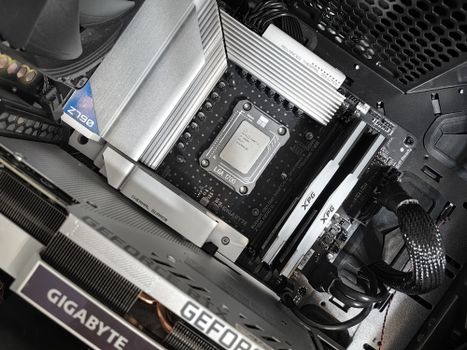
Detailed view of a contemporary gaming computer's components and cooling system. Photo: Martin Lopez / Pexels
At its heart, a Central Processing Unit (CPU) is the brain of your computer, responsible for executing instructions and performing calculations. But when we talk about 'what is a gaming CPU,' we're referring to a processor specifically optimized to handle the unique demands of modern video games. Unlike a standard office CPU that might prioritize energy efficiency or multitasking for productivity software, a gaming CPU emphasizes raw processing power, high clock speeds, and efficient handling of parallel tasks to deliver smooth, high frame-rate experiences. Modern games are incredibly complex, requiring the CPU to perform a myriad of calculations simultaneously. This includes everything from artificial intelligence (AI) routines for non-player characters (NPCs), intricate physics simulations (like destructible environments or realistic fluid dynamics), real-time world generation, and managing vast amounts of data for game assets. The CPU doesn't directly render the graphics – that's the job of the Graphics Processing Unit (GPU) – but it acts as the director, preparing all the necessary information and instructions for the GPU to render frames efficiently. Without a capable gaming CPU, even the most powerful GPU can be bottlenecked, meaning it can't operate at its full potential because it's waiting for the CPU to feed it data. Key characteristics of a potent gaming CPU include a high clock speed (measured in GHz), which dictates how many cycles per second the CPU can perform. While higher clock speeds are generally beneficial for gaming, the number of cores and threads also plays a significant role. Cores are individual processing units, and threads are virtual cores that allow a single physical core to handle multiple tasks concurrently. Most modern games can utilize multiple cores and threads, making CPUs with 6 to 8 cores and 12 to 16 threads a sweet spot for gaming. Cache memory, a small amount of extremely fast memory built directly into the CPU, also impacts performance by storing frequently accessed data, reducing the need to retrieve it from slower RAM. Understanding these components is crucial because a well-chosen gaming CPU ensures that your system can keep up with the demands of current and future titles, providing a seamless and immersive gaming experience without frustrating stutters or slowdowns. It's the foundation upon which your entire gaming rig is built, directly influencing how smoothly games run, how quickly levels load, and how responsive your inputs feel. Investing in a good gaming CPU is an investment in the overall quality of your gaming sessions, allowing you to fully appreciate the detailed worlds and fast-paced action that modern games offer.

The Anatomy of a Gaming CPU: Cores, Clock Speed, and Cache Explained

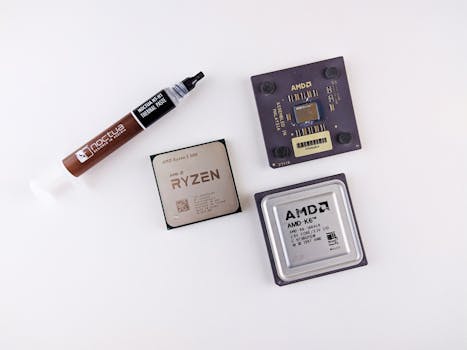
Close-up of a vintage AMD motherboard featuring the AM486 DX processor, showcasing retro computing technology. Photo: Nicolas Foster / Pexels
Delving deeper into the technical specifications, three primary factors define the performance of a gaming CPU: cores, clock speed, and cache. Each of these elements contributes uniquely to how effectively your processor handles the rigors of gaming. Let's break them down. **Cores and Threads:** Think of cores as individual mini-processors within your CPU. Each core can handle a separate task. Older games and applications were often 'single-threaded,' meaning they primarily utilized one core. However, modern games are increasingly 'multi-threaded,' designed to distribute their workload across multiple cores. This is why CPUs with more cores, typically 6 to 8 for gaming, offer significant advantages. Threads are a related concept; 'hyper-threading' (Intel) or 'simultaneous multi-threading' (AMD) allows a single physical core to process two threads of instructions concurrently, effectively doubling its capacity for certain workloads. For gaming, having a good balance of physical cores and logical threads (e.g., 6 cores/12 threads or 8 cores/16 threads) provides excellent performance, allowing the CPU to manage game logic, background processes, and operating system tasks without breaking a sweat. **Clock Speed (GHz):** Clock speed, measured in gigahertz (GHz), indicates how many processing cycles a CPU can complete per second. A higher clock speed generally means faster individual core performance, which is still highly relevant for gaming. Even with multi-threaded games, certain critical game logic often runs on a single thread or a few threads that benefit immensely from high clock speeds. For instance, a CPU running at 4.5 GHz can execute 4.5 billion cycles per second. CPUs often have a base clock speed and a 'boost' clock speed, which is the maximum speed a core can reach under specific conditions, like when a game demands peak performance. For gaming, aiming for CPUs with high boost clock speeds is crucial, as it directly translates to snappier performance and potentially higher frame rates in games. **Cache Memory:** Cache is a small, extremely fast memory pool located directly on the CPU die. Its purpose is to store frequently accessed data and instructions, so the CPU doesn't have to retrieve them from the much slower main system RAM (Random Access Memory). There are typically three levels of cache: L1 (fastest, smallest, per-core), L2 (larger, slightly slower, per-core or shared), and L3 (largest, slowest of the caches, shared across all cores). For gaming, a larger L3 cache, in particular, can significantly improve performance by reducing latency and ensuring the CPU has quick access to vital game data. When the CPU needs data, it checks the cache first; if it's there (a 'cache hit'), it's retrieved almost instantly. If not (a 'cache miss'), the CPU has to fetch it from RAM, which takes considerably longer, potentially causing micro-stutters or delays in game processing. A generous cache size helps keep the CPU fed with data, preventing bottlenecks and ensuring a smoother gaming experience. Understanding these core components allows you to decipher CPU specifications and make an informed decision, balancing core count, clock speed, and cache size to match your gaming needs and budget.

Intel vs. AMD: Choosing Your Gaming CPU Champion

Close-up of a vintage motherboard showcasing Intel microprocessor and slots for hardware integration. Photo: Nicolas Foster / Pexels
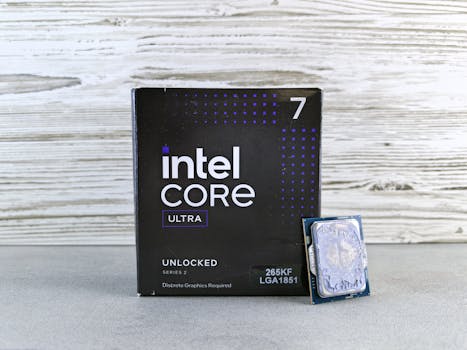
The gaming CPU market is primarily a two-horse race between Intel and AMD, each offering compelling processors with distinct architectures and advantages. Deciding between them often comes down to specific performance needs, budget, and ecosystem preferences. Both companies have made significant strides in recent years, leading to intense competition that ultimately benefits consumers with more powerful and efficient options. **Intel's Offerings:** Intel's Core 'i' series processors (e.g., i5, i7, i9) have long been synonymous with gaming performance. Historically, Intel CPUs often held an edge in single-core performance, which was crucial for many older and even some current games that don't fully utilize multiple cores. Their processors are renowned for strong per-core performance and often boast higher clock speeds, leading to excellent frame rates in many titles. Intel's latest generations, like the 13th and 14th Gen, feature a hybrid architecture combining 'Performance-cores' (P-cores) for demanding tasks like gaming and 'Efficient-cores' (E-cores) for background processes, aiming to optimize both performance and power efficiency. This design allows for robust multitasking while maintaining peak gaming prowess. Intel CPUs typically pair with motherboards using chipsets like Z790 or B760, and they often demand slightly higher power consumption, which should be factored into your cooling solution and power supply choices. For gamers prioritizing raw, unadulterated frame rates in most titles, especially at higher resolutions, Intel remains a strong contender. **AMD's Ryzen Processors:** AMD's Ryzen series has revolutionized the CPU landscape, offering incredible value and competitive performance, particularly in multi-threaded workloads. Ryzen processors, especially the 'X' and 'X3D' variants, are highly popular among gamers. The 'X3D' line, featuring AMD's 3D V-Cache technology, significantly boosts gaming performance by dramatically increasing the CPU's L3 cache, directly translating to higher frame rates in many cache-sensitive games. AMD CPUs generally offer a better core-to-price ratio, making them excellent for content creation and streaming alongside gaming. Their platform, often utilizing chipsets like X670 or B650, has also been known for longer socket compatibility, potentially allowing for easier upgrades down the line. AMD processors are typically more power-efficient than their Intel counterparts, which can translate to lower cooling requirements. For gamers who also stream, create content, or simply want excellent multi-core performance without sacrificing gaming prowess, AMD Ryzen offers a compelling alternative. **Making Your Choice:** The 'best' gaming CPU isn't a one-size-fits-all answer. It depends on your budget, the specific games you play, your desired resolution and frame rate, and whether you engage in other CPU-intensive tasks like video editing or streaming. Benchmarks from reputable tech review sites are your best friend here. Compare how specific Intel and AMD CPUs perform in the games you care about. Consider the total platform cost, including the motherboard, RAM, and cooling. Both Intel and AMD offer fantastic CPUs that can power an exceptional gaming experience; the key is to align their strengths with your personal usage scenario.

Optimizing Your Gaming CPU: Tips for Peak Performance

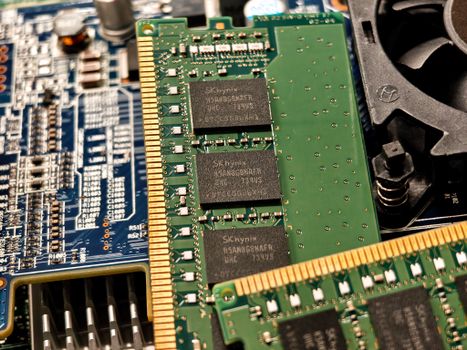
Getting the most out of your gaming CPU isn't just about buying the most expensive chip; it's also about optimizing your system to ensure it performs at its peak. Here are several crucial tips to maximize your gaming CPU's potential: * **Maintain Proper Cooling:** Overheating is the enemy of CPU performance. When a CPU gets too hot, it 'throttles' or reduces its clock speed to prevent damage, leading to frame rate drops and stuttering. Invest in a good CPU cooler (air or liquid), ensure proper airflow in your PC case with well-placed fans, and regularly clean dust filters. Monitoring your CPU temperatures with software is a good practice. * **Overclocking (with caution):** Many gaming CPUs are 'unlocked,' meaning their clock speed multiplier can be adjusted. Overclocking involves manually increasing the CPU's clock speed beyond its factory settings to gain extra performance. This can yield noticeable frame rate boosts, but it also increases heat output and power consumption. Only attempt overclocking if you have adequate cooling, a robust power supply, and are comfortable with the risks, as it can potentially reduce component lifespan if done incorrectly. Always research guides specific to your CPU model. * **Update Drivers and BIOS:** Keep your motherboard's BIOS/UEFI firmware and chipset drivers up to date. Manufacturers frequently release updates that improve CPU stability, performance, and compatibility. Graphics card drivers are also critical, as they optimize the communication between your CPU and GPU. * **Optimize Operating System Settings:** * **Power Plan:** Ensure your Windows power plan is set to 'High Performance' or 'Ultimate Performance' to prevent the CPU from downclocking when under load. * **Background Processes:** Close unnecessary applications and background processes before launching a game to free up CPU cycles and RAM. Task Manager can help identify resource hogs. * **Game Mode:** Windows Game Mode can help prioritize game processes, allocating more CPU and GPU resources to your game. * **Balance CPU and GPU:** A common mistake is to overspend on one component while neglecting the other. A powerful CPU paired with a weak GPU (or vice-versa) creates a 'bottleneck,' meaning one component is waiting for the other, limiting overall performance. Aim for a balanced system where your CPU and GPU are well-matched for your target resolution and frame rate. Use online bottleneck calculators as a rough guide, but real-world benchmarks are more reliable. * **Fast RAM:** While the CPU has its own cache, fast RAM (especially with low latency) significantly helps feed data to the CPU quickly. For gaming, 16GB or 32GB of DDR4 or DDR5 RAM with speeds of 3200MHz to 6000MHz (depending on the generation) is often recommended. Enable XMP (Intel) or DOCP (AMD) in your BIOS to ensure your RAM runs at its advertised speed. * **SSD for Games:** While not directly affecting CPU performance, installing games on a Solid State Drive (SSD) significantly reduces loading times, which indirectly enhances the gaming experience by getting you into the action faster. The CPU spends less time waiting for data to load from a slow hard drive. By implementing these optimizations, you can ensure your gaming CPU is always operating at its best, providing you with the smoothest and most enjoyable gaming experience possible.

Comparison

FeatureHigh-End Gaming CPU (e.g., i9/Ryzen 9)Mid-Range Gaming CPU (e.g., i7/Ryzen 7)Budget Gaming CPU (e.g., i5/Ryzen 5)
Cores/Threads8-24 cores / 16-32 threads6-12 cores / 12-20 threads6 cores / 12 threads
Clock Speed (Boost)5.5 GHz+4.8 - 5.5 GHz4.2 - 4.8 GHz
L3 Cache32MB - 128MB+16MB - 32MB12MB - 16MB
Best ForEsports, 4K gaming, streaming, content creationHigh-refresh 1440p/1080p, AAA gaming, light streaming1080p/1440p gaming, entry-level AAA
Price Range (CPU Only)$400 - $800+$250 - $400$150 - $250
Cooling RequiredHigh-end AIO/Air coolerGood air/AIO coolerStock/entry-level air cooler
Future-ProofingExcellentGoodModerate

What Readers Say

"Upgrading my CPU was a game-changer! I finally understand what is a gaming CPU's impact. My frame rates in Cyberpunk 2077 jumped by almost 30 FPS, and stuttering is a thing of the past. Absolutely worth the investment for a smoother experience."

Alex P. · Seattle, WA

"I used to think my GPU was everything, but after reading up on what is a gaming CPU, I swapped out my old processor. Now, my streaming setup runs flawlessly, and I can play Apex Legends without any drops, even with OBS running. Huge difference!"

Maria G. · Austin, TX

"My new Ryzen 7 CPU completely transformed my gaming rig. Loading times are instant, and I can run multiple applications alongside demanding games without any performance hit. It's truly amazing what a powerful gaming CPU can do for overall system responsiveness."

Ben K. · Orlando, FL

"While my new Intel i5 is fantastic for gaming, I did find that it runs a bit warmer than my previous CPU. Nothing a good cooler couldn't handle, but it's something to be aware of when building. Still, the performance boost is undeniable."

Chloe L. · Denver, CO

"As a video editor who also games, understanding what is a gaming CPU that can handle both tasks was key. My AMD Ryzen 9 not only crushes AAA games at high settings but also renders my 4K video projects in a fraction of the time. Truly a versatile powerhouse."

David M. · Chicago, IL

Frequently Asked Questions

What is the most important factor for a gaming CPU?

For gaming, a balance of high clock speeds, a good number of cores (typically 6-8), and sufficient L3 cache is most important. While all factors contribute, high boost clock speeds often directly translate to better frame rates in many games, though multi-core performance is becoming increasingly relevant.

Can a cheap CPU bottleneck a powerful GPU?

Yes, absolutely. A CPU bottleneck occurs when the CPU cannot process data and instructions fast enough to keep the GPU fully utilized. This means your expensive GPU will sit idle part of the time, leading to lower frame rates than it's capable of, and a less smooth gaming experience. It's crucial to balance your CPU and GPU.

How do I check if my CPU is good for gaming?

You can check your CPU's specifications (model, clock speed, cores/threads) and compare them to recommended requirements for the games you want to play. Benchmarking websites and YouTube reviews that test your specific CPU in various games can also provide real-world performance insights. Monitoring in-game CPU utilization can also indicate if it's struggling.

How much should I spend on a gaming CPU?

The ideal budget for a gaming CPU varies, but a good rule of thumb is to allocate 15-25% of your total PC build budget to the CPU. For solid 1080p/1440p gaming, expect to spend between $150-$350. High-end CPUs for 4K gaming or streaming can range from $400 to $800 or more.

Is an Intel i7 or AMD Ryzen 7 better for gaming?

Neither is definitively 'better' across the board; it depends on the specific generation and model. Intel i7s often excel in raw single-core speed, while AMD Ryzen 7s typically offer more cores/threads and better multi-core performance, making them great for gaming and streaming. Always compare specific models from current generations and check benchmarks for your preferred games.

Who should prioritize a high-end gaming CPU?

Gamers aiming for very high refresh rates (144Hz+) at 1080p or 1440p, competitive esports players who need every frame, streamers who game and encode simultaneously, and content creators who also use their PC for demanding tasks like video editing or 3D rendering should prioritize a high-end gaming CPU.

Does CPU affect game graphics quality?

Indirectly, yes. While the GPU is primarily responsible for rendering graphics quality (textures, anti-aliasing, etc.), a weak CPU can prevent the GPU from being fully utilized, leading to lower frame rates even at lower graphics settings. A powerful CPU ensures the GPU receives data quickly enough to render high-quality graphics smoothly.

What are the future trends for gaming CPUs?

Future gaming CPUs are likely to continue focusing on hybrid architectures (P-cores/E-cores), increased core counts for better multitasking and multi-threaded game optimization, larger and faster integrated cache (like AMD's 3D V-Cache), and improved power efficiency. Integration with AI acceleration features is also a growing trend, potentially impacting game performance and features.

Understanding what is a gaming CPU and its pivotal role in your system is the first step towards an unparalleled gaming experience. Whether you're building a new rig or upgrading an existing one, choosing the right processor will unlock new levels of performance and immersion. Don't let a bottleneck hold you back – empower your gaming with the perfect CPU today!

Topics: gaming cpubest gaming cpucpu for gaminggaming processorcpu performance gaming
Leo List
Brampton weed
Adultwork EstrelaBet Vai de Bet R7 Bet Betão Galera Bet Rainbet Bet9ja Shop SportyBet BetKing Sisal Loto Foot Hollywoodbets YesPlay Odibets RushBet Jugabet BetWarrior BetCity MSport betPawa Fortebet