Illuminate Your Play: The Ultimate Gaming Desk with RGB Lighting
June 24, 2026 16 min read 3,124 words
Elevate your gaming environment with dynamic lighting, superior ergonomics, and smart features for an unparalleled experience.
Find Your Perfect Desk
The Allure of RGB: More Than Just Pretty Lights for Your Gaming Desk
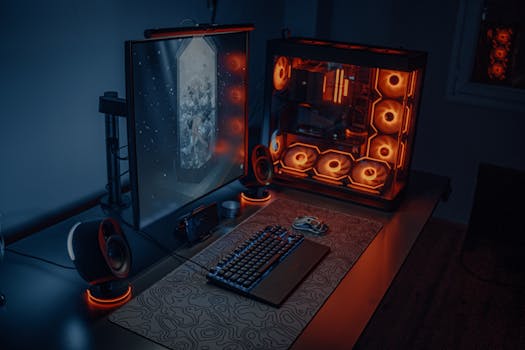 Photo: Atahan Demir / Pexels
In the vibrant world of
gaming, every detail contributes to the overall experience. While high-performance components and crystal-clear monitors often take center stage, the environment in which you play is equally critical. This is where the gaming desk with RGB lighting steps in, transforming a mere functional surface into a dynamic, immersive command center. Far from being a superficial gimmick, integrated RGB lighting offers a multitude of benefits that enhance both the aesthetics and the practical utility of your gaming space. It's about setting the mood, expressing your personal style, and even subtly improving your focus.
First and foremost, the aesthetic impact is undeniable. A gaming desk with RGB lighting instantly elevates the look of any room. Gone are the days of drab, utilitarian workspaces. With millions of colors at your fingertips, you can create a personalized ambiance that reflects your favorite game, your team colors, or simply your current mood. Imagine a warm, fiery red pulsating during an intense battle, or a calming, oceanic blue during a strategic planning phase. This visual customization isn't just for show; it contributes to the overall 'vibe' of your setup, making it a more inviting and exciting place to spend hours. For many gamers, their setup is an extension of their personality, and RGB lighting provides an unparalleled canvas for this expression. It allows for a seamless integration with other RGB-enabled peripherals, like keyboards, mice, and headsets, creating a cohesive and stunning light show that wraps around you.
Beyond the visual appeal, RGB lighting on your desk can significantly enhance immersion. When the lights in your room are dimmed, the subtle glow emanating from your desk can reduce eye strain by providing a soft bias light behind your monitor, making the contrast between the screen and its surroundings less harsh. More importantly, advanced RGB systems can often synchronize with in-game events, flashing red when you take damage, or pulsing blue when you activate a special ability. This real-time feedback blurs the line between the virtual and physical worlds, drawing you deeper into the game. It creates a sensory extension of the game itself, making every explosion more impactful and every victory more triumphant. This level of dynamic interaction is a game-changer for serious enthusiasts seeking the ultimate immersive experience.
Furthermore, the integration of RGB lighting into the desk itself often signifies a commitment to modern design and smart features. These desks are typically engineered with cable management in mind, providing channels and grommets to hide unsightly wires, allowing the light to be the focal point rather than a tangled mess. Some advanced models even include built-in USB hubs or wireless charging pads, consolidating your setup and reducing the need for external accessories. This thoughtful design contributes to a cleaner, more organized workspace, which in turn can lead to better focus and less distraction during critical gaming moments. The convenience of having power and connectivity integrated into your desk cannot be overstated, streamlining your setup process and keeping your valuable desktop real estate free for what matters most: your game and your peripherals. The evolution of gaming desks has moved beyond simple surfaces to sophisticated control centers, and RGB lighting is a key indicator of this progression, offering both form and function in equal measure.
Ergonomics Meets Illumination: Crafting Your Perfect Gaming Sanctuary
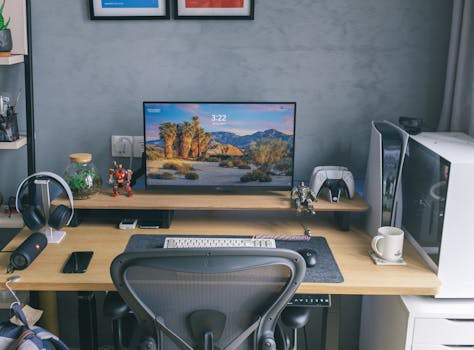 Photo: Huy Phan / Pexels
While the dazzling lights of a gaming desk with RGB lighting are captivating, the core function of any desk, especially for gamers, remains its ergonomic capabilities. Spending long hours at your computer demands a setup that supports your posture, reduces strain, and promotes overall well-being. A truly premium RGB gaming desk seamlessly blends cutting-edge illumination with intelligent ergonomic design, ensuring that your vibrant workspace doesn't come at the cost of your health or comfort. This dual focus is paramount for anyone looking to invest in a setup that will serve them well for years to come, preventing issues like back pain, neck strain, and carpal tunnel syndrome that can plague dedicated gamers.
One of the most critical ergonomic features to consider is adjustability. Many high-end gaming desks, including those with integrated RGB, offer height adjustment. This can range from manual crank systems to sophisticated electric motors that allow you to switch between sitting and standing positions with the press of a button. The ability to vary your posture throughout the day is a game-changer for preventing fatigue and maintaining good circulation. Standing desks, in particular, have gained immense popularity for their health benefits, and having one with RGB lighting adds a layer of personalization and flair to this functional advantage. Beyond height, look for desks with adjustable monitor mounts or ample space to position your monitors at eye level, preventing neck strain from looking down or up for extended periods. The ideal ergonomic setup ensures that your elbows are at a 90-degree angle, your wrists are straight, and your feet are flat on the floor or a footrest.
Material quality and surface design also play a significant role in ergonomics and overall user experience. A sturdy, stable desk minimizes wobble, which can be distracting and uncomfortable, especially during intense gaming sessions. Desks made from high-density fiberboard, solid wood, or even metal alloys provide excellent durability and support for heavy gaming rigs. The surface itself should be smooth yet offer enough friction for your mousepad to stay put. Some desks feature specialized coatings or textures designed to be more comfortable for resting forearms or to resist sweat and spills, adding another layer of practical ergonomics. Edge design is also important; rounded or beveled edges are far more comfortable for resting your wrists and forearms than sharp, unforgiving corners, preventing pressure points and discomfort over time.
Cable management, while often considered a purely aesthetic feature, also contributes significantly to ergonomics. A cluttered desk with wires snaking everywhere is not only an eyesore but can also interfere with mouse movement, snag peripherals, and even pose a tripping hazard. A gaming desk with integrated cable trays, grommets, and routing channels ensures that all your wires are neatly tucked away, creating a clean, unobstructed workspace. This allows for unrestricted movement of your mouse and keyboard, crucial for competitive gaming, and reduces the mental clutter that a messy environment can create. When combined with smart RGB lighting, the clean lines of a well-managed desk allow the illumination to truly shine, enhancing the visual appeal without sacrificing functionality. Ultimately, the best gaming desk with RGB lighting is one that not only looks spectacular but also supports your body and optimizes your performance, proving that style and substance can indeed coexist harmoniously in your gaming sanctuary.
Choosing Your Illuminated Command Center: Features and Considerations for Your RGB Gaming Desk
 Photo: Alena Darmel / Pexels
When delving into the market for a gaming desk with RGB lighting, the sheer variety can be overwhelming. To make an informed decision, it's crucial to understand the key features and considerations that differentiate one desk from another. Beyond the obvious aesthetic appeal of the lights themselves, several practical aspects will dictate how well a desk integrates into your specific gaming setup and meets your long-term needs. A thoughtful approach to selection ensures you invest in a piece of furniture that is both visually stunning and highly functional, serving as the bedrock of your
gaming experience for years to come.
First, consider the size and shape of the desk. Measure your available space meticulously. Do you need a compact desk for a small room, or do you have the luxury of a large L-shaped desk for multiple monitors and expansive peripheral space? L-shaped desks are particularly popular among streamers and content creators who require dedicated areas for their main gaming setup and a secondary station for cameras, mixing boards, or chat displays. Straight desks are more traditional and can fit into narrower spaces. Also, think about the depth; a deeper desk provides more distance from your monitors, which can be more comfortable for your eyes and allow for larger monitor sizes. Ensure there's enough surface area not just for your monitors and PC, but also for your keyboard, mouse, mousepad, speakers, and any other essential peripherals you use regularly.
Next, evaluate the RGB lighting system itself. Not all RGB is created equal. Some desks feature simple, single-color LED strips with basic on/off functionality, while others boast advanced addressable RGB (ARGB) lighting that allows for intricate patterns, multiple colors simultaneously, and seamless integration with popular RGB ecosystems like Razer Chroma, Corsair iCUE, or ASUS Aura Sync. Check how the lighting is controlled – is it via a physical button on the desk, a remote control, or dedicated software on your PC? Software control offers the most versatility, allowing for synchronization with games, music, and other peripherals, creating a truly immersive light show. Also, consider the brightness and diffusion of the lights; well-diffused lighting provides a smoother, more premium look than harsh, visible individual LEDs.
Beyond the lights, look at the additional features that enhance usability. Built-in USB hubs are incredibly convenient for connecting peripherals without having to reach behind your PC. Headphone hooks keep your headset within easy reach and off the desk surface. Cup holders prevent accidental spills, a common hazard for gamers. Integrated power outlets can simplify cable management by providing direct power for monitors and accessories. Some desks even come with monitor stands or risers, which can be excellent for achieving optimal monitor height and freeing up valuable desk space. The material of the desk top is also important; carbon fiber texture is popular for its sleek look and durability, while tempered glass can offer a premium aesthetic, though it may be more prone to fingerprints and require more frequent cleaning. Always prioritize stability and durability – a wobbly desk can be incredibly frustrating during intense gaming. Reading reviews and checking user feedback on specific models can provide invaluable insights into the real-world performance and longevity of these features, ensuring your illuminated command center is as robust as it is radiant.
Maximizing Your RGB Gaming Desk: Tips for Setup and Maintenance
 Photo: RDNE Stock project / Pexels
Acquiring a state-of-the-art gaming desk with RGB lighting is just the first step; maximizing its potential requires thoughtful setup and diligent maintenance. A properly configured and cared-for desk will not only look stunning but also contribute to a more efficient and enjoyable gaming experience. Here are some essential tips to get the most out of your illuminated command center:
* **Optimal Placement for Impact:** Position your desk strategically within your room. If the RGB lighting is a key feature, consider placing it against a wall that allows the light to reflect or subtly illuminate the surrounding area. Avoid placing it directly in front of a window if glare is an issue during the day, or if you want the RGB effects to be most prominent at night. Ensure there's enough space around the desk for comfortable movement and access to your PC tower if it's not on the desk itself.
* **Master Cable Management:** Even the most beautiful RGB lighting can be overshadowed by a tangle of wires. Utilize the cable management features of your desk – grommets, trays, and channels. If your desk lacks extensive options, invest in adhesive cable clips, Velcro ties, and cable sleeves. Route power cables, display cables, and peripheral cables separately to avoid interference and create a clean, minimalist look that allows your RGB lighting to truly pop.
* **Synchronize Your Ecosystem:** If your gaming desk with RGB lighting is part of a larger RGB ecosystem (e.g., Razer Chroma, Corsair iCUE, ASUS Aura Sync), take the time to synchronize all your devices. This means your desk, keyboard, mouse, headset, and even internal PC components can display coordinated lighting effects, creating a truly immersive and cohesive light show. Experiment with different profiles for various games or moods.
* **Ergonomic Adjustments are Key:** Once everything is set up, fine-tune your ergonomic settings. Adjust the desk height (if applicable) so your forearms are parallel to the floor when typing. Position your monitor(s) so the top of the screen is at eye level. Ensure your chair provides adequate lumbar support. Even with a flashy RGB desk, poor ergonomics can lead to discomfort and injury over time. Regular adjustments can make a significant difference.
* **Regular Cleaning and Care:** Dust is the enemy of electronics and aesthetics. Regularly wipe down your desk surface with a microfiber cloth to prevent dust buildup, which can dull the appearance of your desk and potentially affect the RGB LEDs. For textured surfaces, a soft brush can help. If your desk has a glass top, use a glass cleaner to keep it smudge-free. Be mindful of liquids around your electronics and RGB components.
* **Software Updates and Customization:** Keep your desk's RGB control software (if applicable) updated. Manufacturers often release updates that add new lighting effects, improve performance, or fix bugs. Spend time exploring the customization options – many offer reactive lighting, audio visualization, or even integration with streaming software, allowing you to create unique and dynamic lighting experiences.
By following these tips, you'll not only preserve the pristine look of your gaming desk with RGB lighting but also optimize its functionality, ensuring it remains a central, dazzling, and comfortable component of your ultimate gaming setup.
